BILL, formerly Bill.com, is the default answer when a growing business asks how to stop paying vendors by check. It is a mature product with deep accounting integrations and a large vendor network, and for many companies it is the right call.
It is also priced in a way that makes the real number hard to see until you are three months in. The subscription is per user per month, the payment fees are separate and vary sharply by rail, and the tier you need is often determined by one feature rather than by your size.
This guide lays out the published pricing, works through total cost at three realistic company profiles, and covers seven alternatives with a straight read on where each one actually fits.
The published pricing
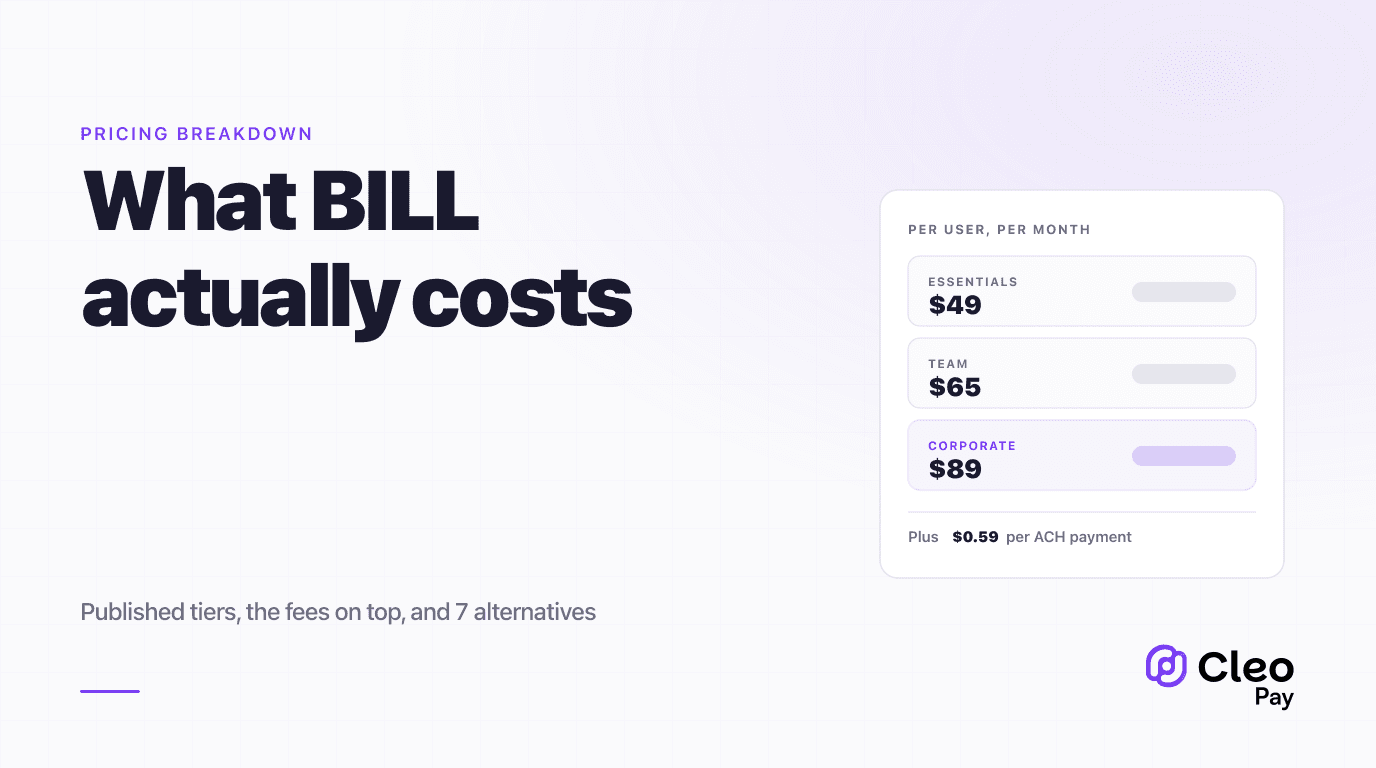
BILL's Accounts Payable product has three published tiers plus a custom Enterprise plan.
The jump most companies actually care about is Essentials to Team. Essentials integrates with your accounting software by CSV import and export. Team adds automatic two-way sync with QuickBooks Online, Pro, Premier, and Xero. If you were planning to use BILL alongside QuickBooks and assumed the cheapest tier would sync, that assumption costs $16 per user per month.
The second jump, Team to Corporate, is mostly about approval policies and user roles. If your approval flow is "one person approves everything," you may not need it. If you need different approvers by amount, department, or entity, you do.
The fees that sit on top
The subscription is not the whole bill. Payments carry their own charges, and the spread between rails is wide.
- Speed
- Standard
- Cost
- $0.59 per payment
- Best for
- The default for almost everything
- Speed
- Same day
- Cost
- $11.99 per payment
- Best for
- Genuine emergencies only
- Speed
- Mail transit
- Cost
- $1.99 per check
- Best for
- Vendors who refuse electronic payment
- Speed
- Wire timing
- Cost
- $19.99 USD
- Best for
- Cross-border vendors billing in USD
- Speed
- Standard
- Cost
- 2.9%
- Best for
- Extending float when the vendor accepts it
Two observations worth making before we do the math.
Same-day ACH is 20 times the cost of standard ACH. At $11.99 versus $0.59, this is a rail to reach for deliberately rather than as a habit. Businesses that let anyone expedite payments discover a meaningful line item at the end of the quarter. Our same-day versus standard ACH breakdown covers when the premium is genuinely worth it.
Card payments at 2.9% are a financing decision, not a payment method. On a $20,000 vendor bill that is $580. That can be entirely rational if it buys you 30 days of float you would otherwise finance more expensively, and it is expensive if you are doing it out of convenience.
What it actually costs: three worked examples
Subscription cost scales on users. Transaction cost scales on payment volume. The two rarely move together, which is why the headline per-user price is a poor predictor of the total.
A 12-location restaurant group. Five users who need access: a controller, two AP clerks, and two GMs who approve. Approval rules vary by location, so Corporate at $89. That is $445 per month in subscription. At 600 vendor payments per month, mostly ACH with about 8% still going out as checks, payments run roughly $325 per month. Total is around $770 per month, or about $9,200 per year. The subscription is 58% of it.
A 40-person agency. Three users on Team at $65, so $195 per month. Payment volume is low, maybe 80 payments a month, nearly all ACH, so about $47. Total is roughly $242 per month. The subscription is 81% of the cost, and per-user pricing dominates completely.
A creator agency paying 200 creators monthly. Two users on Team at $65, so $130 per month. But 200 ACH payouts per month is $118, and this is where the model starts to strain: the cost scales with a payee count that per-seat pricing was never designed to price. Add the operational reality that BILL is built around vendors sending invoices rather than an agency generating payouts, and the fit problem shows up before the cost problem does. Our creator agency payout guide covers that category properly.
Seven alternatives, and who each one fits
Ramp. Offers bill pay on a free tier that includes invoice OCR, mobile approvals, and basic approval workflows, with certain ERP integrations requiring a paid plan. The economics are genuinely hard to beat if the feature set covers you. The business model is card interchange and treasury, so the fit question is whether you want your AP tool tied to your card program. Strongest for venture-backed and growth companies already running Ramp cards.
Melio. No subscription for core bill pay, free ACH transfers on the base plan, with card payments around 2.9%. The lightest option in the category and an easy step up from writing checks. The tradeoffs are depth: approval workflows, multi-entity handling, and reporting are thinner than BILL. Best for small businesses under roughly 100 payments a month with simple approvals.
Tipalti. Built for mass payouts and international breadth, with a platform fee starting around $99 per month and custom pricing above that for volume and advanced modules. Strong tax compliance tooling. It is priced and scoped for the mid-market, so a 15-person company will find it heavy. Best for marketplaces, platforms, and companies with large international supplier or payee counts.
Stampli. Organizes AP around collaboration, keeping the conversation about an invoice attached to the invoice itself. Pricing is quote-based. Companies with contentious or complex approval chains, where the real delay is people arguing about whether a bill is correct, tend to like it most. Less compelling if your approvals are straightforward.
AvidXchange. Aimed squarely at mid-market and industry verticals such as real estate, construction, and property management, with deep integrations into the ERPs those industries actually run. Quote-based pricing. Best when your accounting system is an industry package rather than QuickBooks.
QuickBooks Bill Pay. If you already run QuickBooks Online, bill pay is available natively and the integration is by definition perfect. Volume allowances and per-transaction fees vary by tier. The ceiling arrives when you need multi-entity handling or approval logic beyond what QuickBooks offers. We covered when to move off QuickBooks bill pay in more detail for restaurants.
Cleo Pay. Built for hospitality and agency operators rather than generic small business. Published pricing is $0 for a Free tier covering incoming payments and invoicing, $99 per month for Basic with one seat and 15 payments included at $3 per additional payment, and $299 per month for Pro with 10 seats, 100 payments included, and $2 per additional payment, including same-day RTP, W-9 collection, approval workflows, QuickBooks sync, and automated 1099 filing. The relevant difference versus BILL's model is that seats are bundled rather than priced individually, which changes the math for teams with several approvers. Narrower than BILL outside its target verticals.
What to check before you sign
Count the seats honestly. Per-user pricing rewards underestimating. Include everyone who approves anything, plus your bookkeeper and your outside accountant if they need access. Ask whether approver-only users are discounted, since BILL offers this on higher tiers and it can change the math materially.
Price your actual rail mix. Pull last quarter's payments and count how many were checks, how many were expedited, and how many were international. Apply the fee schedule to those real numbers. The theoretical all-ACH scenario is not your scenario.
Confirm the sync tier. Automatic two-way accounting sync is not on the entry tier. If you are budgeting on the entry price and planning on automatic sync, your budget is wrong by the tier difference times your seat count.
Test multi-entity in the demo. If you run more than one legal entity, bring your real structure to the demo rather than accepting a yes. This is the most common place where an implementation gets stuck after the contract is signed.
Ask about the contract term and seat reductions. Annual commitments are common. Find out whether you can reduce seats mid-term, because AP teams change size and you do not want to pay for a departed clerk for eight months.
The short version
BILL's published 2026 pricing is $49, $65, and $89 per user per month, with Enterprise custom, plus separate payment fees led by $0.59 ACH and $11.99 same-day ACH. The tier decision usually turns on automatic accounting sync at Team and custom approval policies at Corporate rather than on company size.
Before comparing it to anything, work out whether your cost is driven by seats or by payments. That single question sorts the alternatives faster than any feature grid: seat-heavy buyers should look hard at Ramp and QuickBooks Bill Pay, payment-heavy buyers should compare transaction fees, payee-heavy buyers should be looking at payout platforms rather than AP software at all.
If you operate in hospitality or run an agency and want to see how bundled-seat pricing compares against per-user pricing on your actual numbers, book a walkthrough and bring last quarter's payment report.